If you’ve been looking for a rich, martial arts themed open world RPG you can play on the go, you’ve probably already heard of where winds meet mobile. The mobile port stays true to the PC and console versions’ sweeping landscapes, deep combat system, and immersive story, but it comes with a few unique quirks tailored for touchscreen play. I’ve put over 40 hours into the mobile build since its full launch, and I’ve picked up plenty of tricks that would have saved me hours of frustration when I first started. This guide breaks down the most useful tips to help you enjoy the game without getting stuck on basic mechanics or missing out on rare loot.
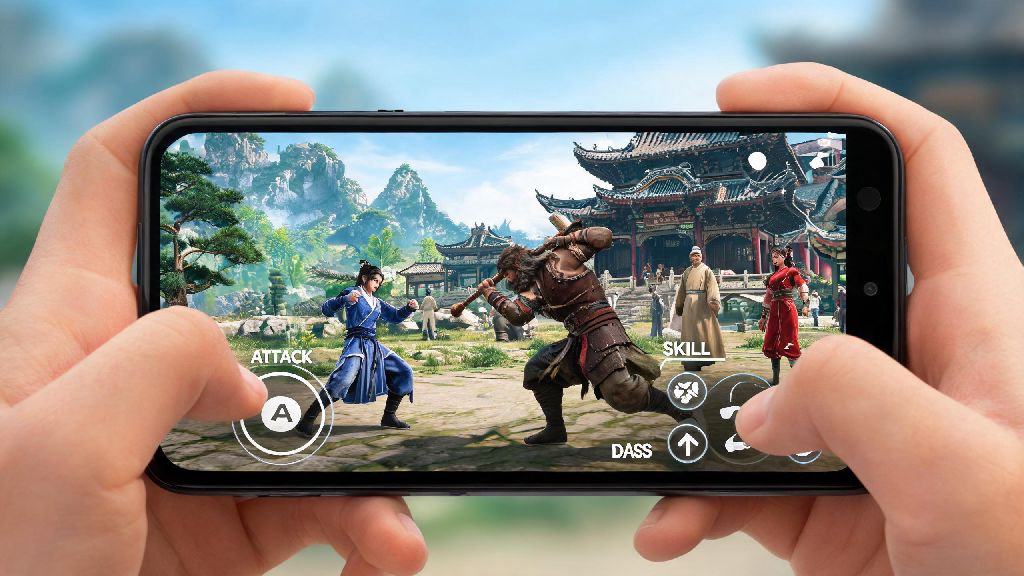
How to Optimize Where Winds Meet Mobile Controls for Touchscreen Play
Most new players jump straight into the story without touching the control settings, and that’s a mistake that will make combat and exploration way harder than it needs to be. The default touch layout crams too many buttons on the lower half of the screen, so you’ll often miss parry or dodge inputs when you’re in a fast-paced fight. You don’t have to stick to the pre-set layouts, either.
I also recommend toggling on the haptic feedback setting for parries and perfect dodges. You’ll get a small vibration when you pull off a successful timing, which is way easier to notice on a small screen than a tiny visual pop-up. Don’t be afraid to tweak the layout for an hour or two as you play, everyone’s hand size and play style is different, so there’s no one “best” setup. Never use the default auto-attack lock for boss fights, it will often target smaller minions instead of the boss’s weak points, wasting your most powerful attacks.
Hidden Exploration Rewards You Shouldn’t Skip
It’s tempting to rush through the main story quests to unlock more combat skills, but taking time to wander off the beaten path will give you way better rewards that make every fight easier. Where Winds Meet’s world is packed with small, easy-to-miss collectibles that give permanent stat boosts, rare crafting materials, and exclusive outfits you can’t buy from in-game shops. Look for glowing white crane statues hidden on mountain peaks, each one gives you a permanent 1% boost to your maximum stamina, which lets you climb higher and glide further as you explore.
You can also find hidden martial arts scrolls in abandoned temples that unlock new skill moves you won’t get from the main quest line. I found one of these scrolls 10 hours into my playthrough that gave me a stun lock combo that made the first three main bosses feel trivial. Don’t ignore the small side quests from random villagers either, many of them lead to secret areas with high tier loot that’s way better than anything you can get from main quest rewards. Always collect every type of herb and crafting material you see, you’ll need them to upgrade your gear later, and backtracking for low level materials is a huge waste of time once you’re past the early game areas.
Combat Tips for Mobile Players to Beat Hard Fights
Combat in Where Winds Meet mobile feels very different from the PC version, since you don’t have a mouse and keyboard to pull off fast combos. But that doesn’t mean you have to struggle with tough enemies, there are plenty of small tricks that make even the hardest fights feel manageable on a touchscreen. Prioritize leveling up your parry skill first, it’s way more useful than stacking attack power in the early game. A perfect parry will stun most enemies for three full seconds, letting you land a full combo without taking any damage. Even against bosses, a well-timed parry will cancel their most powerful attacks, saving you from losing half your health bar in one hit.
Don’t sleep on ranged attacks either, even if you main a close combat weapon like a sword. You can use ranged attacks to pull single enemies from large groups, so you don’t get swarmed by 3 or 4 enemies at once, which is a death sentence on mobile when your inputs are less precise. If you’re struggling with a specific fight, you can also adjust the game’s difficulty in the settings menu at any time, there’s no shame in lowering it to enjoy the story if you’re getting frustrated. Always keep at least 10 health potions in your inventory, you can’t pause mid-fight to craft more, and running out of heals right before you beat a boss is one of the most frustrating experiences in the game.
How to Fix Common Performance Issues on Mobile
Even if you have a newer phone, you might run into lag or frame drops when you’re in busy areas with lots of NPCs or during big boss fights. You don’t have to upgrade your phone to fix these issues, adjusting a few settings will make the game run smoothly without ruining the visual quality. Turn off dynamic shadow effects first, they use up 30% more processing power than any other visual setting, and you barely notice they’re gone when you’re playing on a small screen.
You should also turn on the frame rate limiter set to 30 FPS if you’re playing on a mid-range phone, this prevents sudden frame drops during intense fights and saves your battery life so you can play for longer without charging. If you’re experiencing touch input lag, make sure you don’t have any other apps running in the background, and turn off battery saver mode, which slows down your phone’s processor to save power.
One trick I found that most players don’t know about is clearing the game’s cache once every two weeks. The game stores a lot of temporary data for open world areas you’ve already visited, and clearing that cache can fix random crashes and reduce load times by up to 50% in my experience. You don’t have to worry about losing your save data, it’s all stored on the game’s cloud servers, so clearing the cache is completely safe.
Whether you’re a long time fan of the original PC version or you’re trying the franchise for the first time, where winds meet mobile is one of the most polished open world RPGs you can play on a phone. The small adjustments to controls, settings, and play style we covered here will help you avoid the most common frustrations new players face, so you can focus on enjoying the beautiful world and deep combat system. Don’t be afraid to experiment and play the way you want to, that’s the whole point of an open world game, after all.